


How to Reduce API Costs by 75% and Optimize Your Integration Strategy
Amazon’s announcement about upcoming SP-API pricing changes has sent shockwaves through the seller tools ecosystem. Starting January 31, 2026, Amazon will charge a $1,400 annual subscription fee for all third-party developers, followed by monthly usage fees beginning April 30, 2026 based on GET API call volume. For agencies and software providers who have relied on free API access for years, this represents a fundamental shift in operational economics.
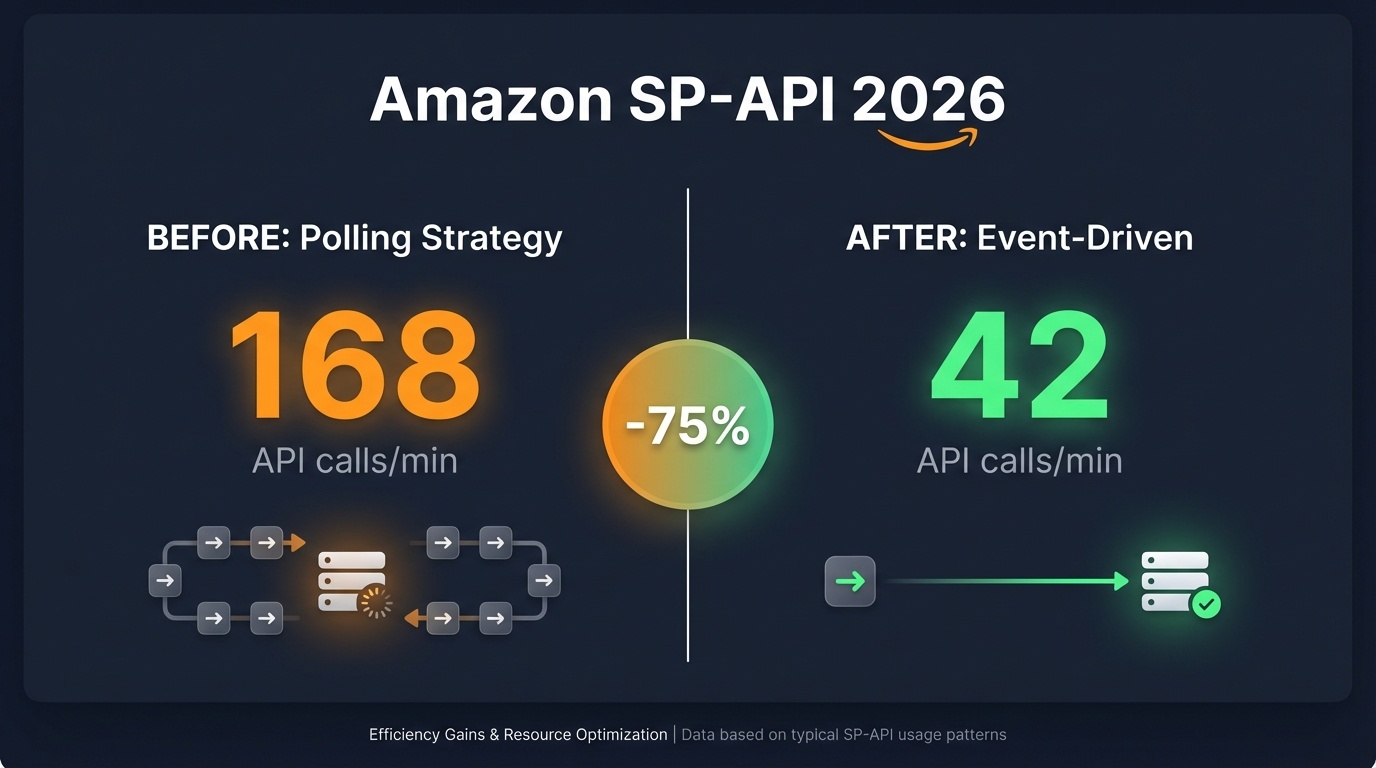
At PPC Assist, we’ve proactively addressed these changes by reducing our API call volume by 75% while maintaining the same level of data accuracy and real-time responsiveness. In this comprehensive guide, we’ll share exactly how we achieved this optimization and provide actionable strategies for agencies managing their own internal tools.
Understanding the New Amazon SP-API Pricing Structure
What’s Changing in 2026
Amazon’s new pricing model introduces two key components:
1. Annual Subscription Fee: $1,400 USD
- Effective January 31, 2026
- Required for all third-party developers
- Includes access to Solution Provider Portal and support services
- Payment information must be submitted by February 16, 2026, or access will be suspended
2. Tiered Monthly Usage Fees (Starting April 30, 2026)
- Basic Tier: 2.5 million GET calls/month (included with subscription, no additional charge)
- Pro Tier: Higher volume allowances with incremental pricing
- Plus Tier: Enterprise-level usage
- Enterprise Tier: Custom solutions for high-volume operations
According to Amazon’s official announcement, developers have until April 30, 2026, to optimize their API usage patterns before monthly billing begins.
The Old Approach: Report API Polling (Inefficient & Costly)
Before the pricing changes, most applications relied heavily on the Reports API with aggressive polling intervals to maintain data freshness:
Common Data Synchronization Patterns:
- Orders: Polling every 15-30 minutes via
GET_FLAT_FILE_ALL_ORDERS_DATA_BY_LAST_UPDATE_GENERAL - Refunds: Hourly polling via
GET_FLAT_FILE_RETURNS_DATA_BY_RETURN_DATE - Listings/Inventory: Every 30-60 minutes for inventory synchronization
- Financial Reports: Daily settlements and transaction reports
- Reimbursements: Regular checks for FBA reimbursement reports
- Cost Data: Frequent storage and fulfillment fee report pulls
The Problem: This approach generates thousands of unnecessary API calls, particularly for accounts with infrequent changes. Under the new pricing model, aggressive polling strategies could push applications into higher pricing tiers, multiplying costs across hundreds or thousands of seller accounts.
The New Strategy: Event-Driven Architecture with Notifications API
The most effective way to reduce API costs is to shift from polling to event-driven notifications. Amazon’s Notifications API allows you to receive real-time updates when specific events occur, eliminating the need for constant polling.
Step 1: Setting Up the Notifications API Infrastructure
The Notifications API supports two delivery workflows:
Option A: Amazon EventBridge (Recommended)
EventBridge provides a fully managed event bus with superior scalability and AWS service integration.
Setup Process:
- Create an EventBridge Destination
POST /notifications/v1/destinations
{
  "resourceSpecification": {
    "eventBridge": {
      "region": "us-east-1",
      "accountId": "YOUR_AWS_ACCOUNT_ID"
    }
  },
  "name": "sp-api-eventbridge-destination"
}
- Configure Event Rules in AWS EventBridge Console
- Create rules to route events to Lambda functions, SQS queues, or other targets
- Set up filters for specific notification types
- Configure dead-letter queues for failed event processing
- Create Subscriptions for Notification Types
POST /notifications/v1/subscriptions/{notificationType}
{
  "destinationId": "YOUR_DESTINATION_ID",
  "payloadVersion": "1.0"
}
Option B: Amazon SQS (Simple Queue Service)
SQS provides direct queue-based message delivery.
Setup Process:
- Create an SQS Queue with proper permissions for Amazon SP-API
- Create an SQS Destination
POST /notifications/v1/destinations
{
  "resourceSpecification": {
    "sqs": {
      "arn": "arn:aws:sqs:us-east-1:123456789:sp-api-notifications"
    }
  },
  "name": "sp-api-sqs-destination"
}
- Poll SQS Queue for notifications (far less frequent than API polling)
Step 2: Implementing Event-Based Order Synchronization
Order data represents the highest-frequency update requirement for most applications. Here’s how to optimize order synchronization with three available methods:
Method 1: ORDER_CHANGE Notifications (Reactive but Incomplete)
The ORDER_CHANGE notification type provides real-time alerts when orders are created or modified.
Advantages:
- Immediate notification of order changes (latency < 1 minute)
- Zero polling required
- Minimal API calls
Limitations:
- Provides only basic order metadata (OrderId, status change, timestamp)
- Does not include complete order details like buyer information, shipping address, or line items
- Missing financial data such as gift pricing, promotions, and taxes
Example Notification Payload:
Copy{
  "notificationType": "ORDER_CHANGE",
  "eventTime": "2025-12-11T10:30:00Z",
  "payload": {
    "orderChangeNotification": {
      "sellerId": "A1EXAMPLE",
      "amazonOrderId": "123-4567890-1234567",
      "orderStatus": "Shipped",
      "lastUpdateDate": "2025-12-11T10:30:00Z"
    }
  }
}
Method 2: Orders API (getOrders & getOrderItems) – Complete but Rate-Limited
The Orders API provides comprehensive order details but comes with strict rate limits.
API Endpoints:
getOrders– Retrieves order-level information- Rate Limit: 0.0167 requests/second (1 request/minute sustained)
- Burst: 20 requests
- Returns buyer info, shipping address, order totals, fulfillment channel
getOrderItems– Retrieves line-item details- Rate Limit: 0.5 requests/second
- Burst: 30 requests
- Returns SKU, ASIN, quantity, item price, tax
Critical Considerations:
- Rate limits are per seller account, not per application
- Exceeding limits results in
429 Too Many Requestserrors - Requires careful throttling and retry logic with exponential backoff
- Multi-marketplace operations multiply API call requirements
Method 3: Flat File Reports (GET_FLAT_FILE_ALL_ORDERS_DATA_BY_LAST_UPDATE_GENERAL) – Batch but Also Limited
The Orders report provides comprehensive data in batch format but is also subject to usage limits.
Characteristics:
- Report Type:
GET_FLAT_FILE_ALL_ORDERS_DATA_BY_LAST_UPDATE_GENERAL - Includes complete order and item-level data
- Can filter by date range (last update time)
- Rate limits apply to report creation requests
- Processing time: 5-30 minutes depending on data volume
Limitations:
- Not suitable for real-time synchronization (report generation delays)
- Still consumes API quota for report creation and download
- Missing certain fields like
item-promotion-discountin some cases
The Optimal Hybrid Solution: Our Implementation at PPC Assist
After extensive testing, we developed a three-tier approach that balances real-time responsiveness with minimal API consumption:
Tier 1: Real-Time Event Capture (Notifications API)
- Subscribe to
ORDER_CHANGEnotifications via EventBridge - Receive instant alerts when orders are created, shipped, or cancelled
- Store basic order metadata immediately
- API Calls: Zero (push-based notifications)
Tier 2: On-Demand Detail Enrichment (Orders API)
- When an
ORDER_CHANGEnotification arrives, trigger a targeted API call - Use
getOrdersto fetch complete order details (buyer info, address, totals) - Use
getOrderItemsto retrieve line-item specifics (SKUs, prices) - Implement intelligent throttling to respect rate limits:
- Queue order IDs for batch processing
- Process orders in 5-second intervals (respecting 0.0167 req/sec limit)
- Use burst capacity for high-volume periods
API Calls: 2 calls per order change (1 for order, 1 for items)
Tier 3: Daily Reconciliation (Reports API)
- Schedule once-daily report generation (e.g., 2 AM UTC)
- Use
GET_FLAT_FILE_ALL_ORDERS_DATA_BY_LAST_UPDATE_GENERALfor the previous 48 hours - Identify and fill gaps in notification-based data
- Capture fields unavailable via Orders API:
item-gift-wrap-priceitem-gift-wrap-tax- Complex promotional discount breakdowns
API Calls: 1-2 calls per day (1 create report, 1 download)
Quantifiable Results: 75% API Call Reduction
Before Optimization (Polling Strategy):
- Orders Report: Every 15 minutes = 96 calls/day
- Refunds Report: Every hour = 24 calls/day
- Inventory Report: Every 30 minutes = 48 calls/day
- Total: ~168 calls/day per seller account
After Optimization (Hybrid Strategy):
- Notifications: 0 calls (push-based)
- Order API calls: ~20-40 calls/day (only for actual order changes)
- Daily reconciliation: 2 calls/day
- Total: ~22-42 calls/day per seller account
Reduction: 70-85% fewer API calls depending on order volume
Extending the Strategy to Other Data Types
The same event-driven principles apply to other critical data sources:
Inventory & Listing Changes
Notification Type: LISTINGS_ITEM_STATUS_CHANGE
- Receive alerts when listing status changes (active, inactive, suppressed)
- Eliminate constant inventory report polling
- Use
Catalog Items APIonly when notifications indicate changes
Returns & Refunds
Notification Type: FBA_OUTBOUND_SHIPMENT_STATUS
- Track fulfillment status changes
- Trigger refund checks only when returns are confirmed
- Reduce refund report polling from hourly to daily
Financial Reports
Strategy:
- Financial settlement reports remain on scheduled daily pulls
- No real-time notification equivalent available
- Single daily API call is acceptable cost-wise
Implementation Best Practices
1. Robust Error Handling & Retry Logic
Copyimport time

def call_orders_api_with_retry(order_id, max_retries=3):
    for attempt in range(max_retries):
        try:
            response = sp_api_client.get_order(order_id)
            if response.status_code == 429:  # Rate limit exceeded
                retry_after = int(response.headers.get('Retry-After', 60))
                time.sleep(retry_after)
                continue
            return response.json()
        except Exception as e:
            if attempt == max_retries - 1:
                raise
            time.sleep(2 ** attempt)  # Exponential backoff
2. Intelligent Caching
- Cache Orders API responses for 24 hours
- Use ETags for conditional requests when re-fetching
- Implement database-level deduplication
3. Multi-Account Throttling
- Implement global rate limiters across all seller accounts
- Use token bucket algorithm for burst handling
- Monitor per-account rate limit headers
4. Monitoring & Alerting
- Track API call volumes in real-time
- Set up alerts for approaching tier limits
- Monitor notification processing delays
The Alternative: Outsource the Complexity
While the strategies outlined above can dramatically reduce API costs, they require significant engineering resources to implement and maintain:
- Infrastructure Management: AWS EventBridge, SQS, Lambda functions, monitoring systems
- Ongoing Maintenance: Adapting to Amazon’s frequent API changes (breaking changes occur 2-3 times per year)
- Rate Limit Management: Sophisticated throttling logic across hundreds of accounts
- Data Quality Assurance: Reconciliation processes to catch missed notifications
- Cost Optimization: Continuous monitoring to avoid tier overages
Why Agencies Choose PPC Assist
At PPC Assist, we’ve built enterprise-grade infrastructure that handles all of this complexity for you:
✅ Turnkey Amazon Advertising Automation
- Rule-based bidding strategies
- AI Chat assistant
- Keyword harvesting and negative keyword automation
- Campaign structure optimization
✅ Advanced Reporting & Analytics
- Performance dashboards
- Custom attribution models
- Profitability analysis with COGS integration
- Multi-marketplace consolidation
✅ White-Label Dashboard Solutions
- Fully branded client portals
- No Looker Studio setup required
- Embedded reports and visualizations
- Client-level access controls
✅ Zero API Management Overhead
- We handle all SP-API integration and optimization
- Automatic adaptation to Amazon’s API changes
- Compliance with rate limits and cost tiers
- No infrastructure maintenance required
✅ Cost Predictability
- Flat subscription pricing
- No surprise API overage charges
- Unlimited seller accounts (on enterprise plans)
- Transparent pricing structure
Cost Comparison: Build vs. Buy
Building In-House:
Initial Development:
- Senior developer time: 200-400 hours @ $100-150/hour = $20,000-60,000
- AWS infrastructure setup: $2,000-5,000
- Testing and QA: $5,000-10,000
Ongoing Costs:
- Amazon SP-API subscription: $1,400/year
- Monthly API usage fees: $500-3,000/month (depending on volume)
- AWS infrastructure: $200-500/month
- Maintenance developer time: 40 hours/month @ $100-150/hour = $4,000-6,000/month
- Total annual cost: ~$60,000-100,000+
Using PPC Assist:
- Subscription pricing: Starting at $599/month
- No development costs
- No infrastructure management
- No API fee exposure
- Total annual cost: $7,188+ (based on plan)
ROI: Agencies save 90%+ on total cost of ownership while gaining access to battle-tested features and ongoing innovation.
Getting Started with API Optimization
If You’re Building In-House:
- Audit your current API usage via Amazon’s Fee Preview Tool
- Prioritize Notifications API implementation for high-frequency data (orders, inventory)
- Implement the hybrid approach outlined in this guide
- Test thoroughly before January 31, 2026
- Monitor usage and adjust as monthly billing approaches
If You’re Exploring Managed Solutions:
Schedule a demo with PPC Assist to see how we can:
- Migrate your clients seamlessly
- Provide white-label dashboards
- Eliminate API management overhead
- Deliver advanced automation features your team may not have time to build
Conclusion: Adapt Now or Pay Later
Amazon’s SP-API pricing changes represent a fundamental shift in the economics of seller tool development. The days of unlimited free API access are ending, and applications that don’t adapt will face exponentially increasing costs.
By implementing event-driven architecture with the Notifications API, agencies can reduce API calls by 70-85% while maintaining real-time data accuracy. However, this requires significant engineering expertise and ongoing maintenance.
For agencies focused on client success rather than infrastructure management, partnering with a specialized platform like PPC Assist offers a proven path to:
- Eliminate API cost uncertainty
- Access enterprise-grade automation and reporting
- Scale client portfolios without technical bottlenecks
- Stay ahead of Amazon’s continuous platform changes
The choice is clear: invest hundreds of hours optimizing your API integration, or leverage a battle-tested platform that’s already done the work.
Additional Resources
- Amazon SP-API Official Documentation
- Call Optimization Guidance from Amazon
- Notifications API Use Case Guide
- Orders API Rate Limits
Ready to eliminate Amazon API headaches and scale your agency?
👉 Book Your PPC Assist Demo Today
Last updated: December 2025
About PPC Assist
PPC Assist is an Amazon advertising automation/assistant and analytics platform trusted by agencies and brands managing millions in ad spend. Our platform combines sophisticated automation rules, real-time reporting, and white-label dashboards to help agencies scale profitably without technical complexity.


Leave a Reply